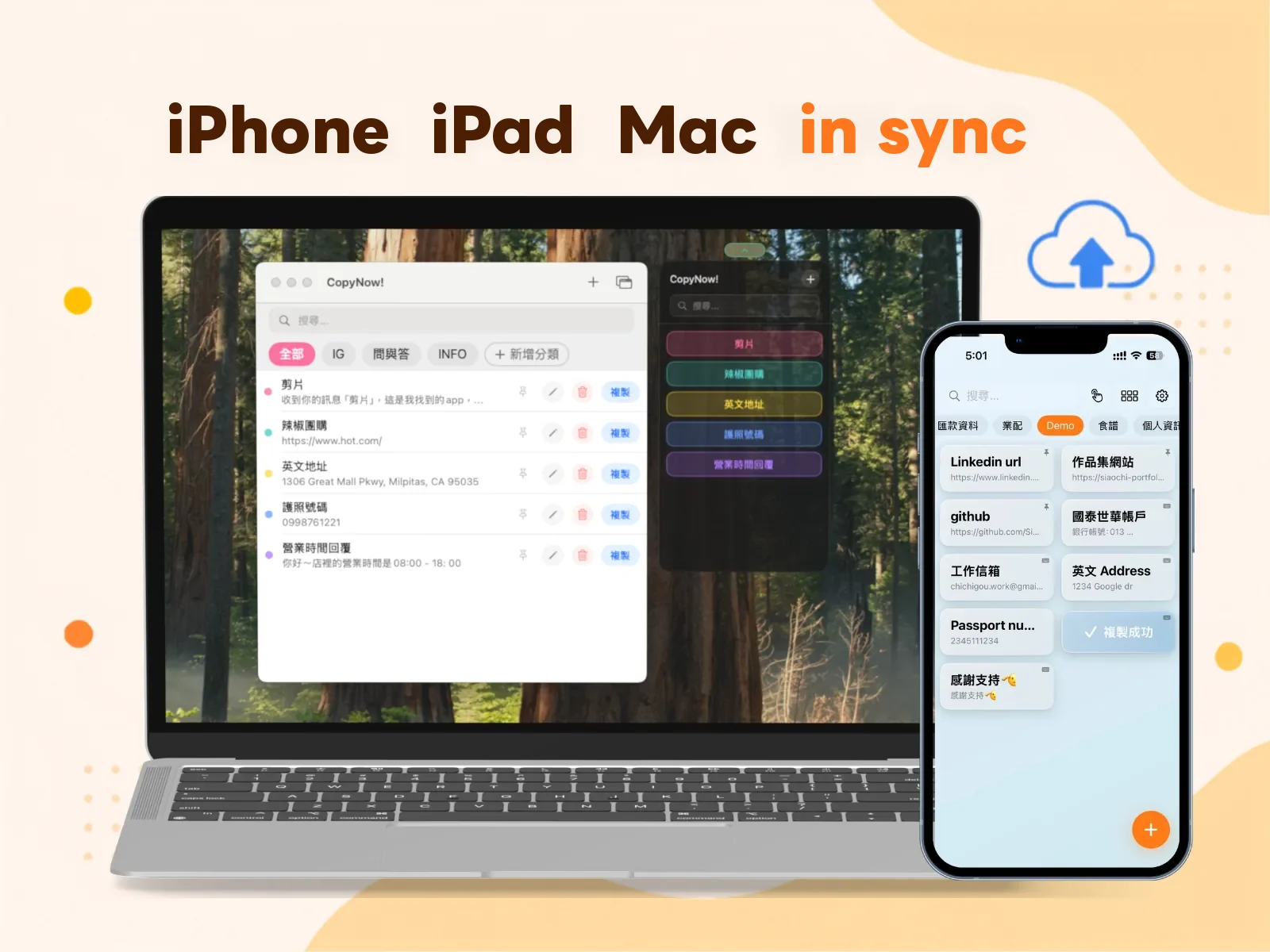
Save a card on your iPhone and it’s waiting when you open your Mac. Change a category on the Mac and it’s changed on the iPhone too.
That sounds like table stakes, but sync is where cross-device apps break most often. This post covers three things: how it works, where your data actually lives, and what order to check things in when it doesn’t sync.
In one line: it runs on your own iCloud
CopyNow’s sync is built entirely on your own iCloud account.
When you add or edit a card, the change is written to your iCloud private database, then syncs automatically to any device signed in to the same Apple ID.
None of this requires an account. There’s no CopyNow login, no password, no email verification. You open it and it works.
Where your data lives (and what we can’t see)
This deserves its own section, because it decides how sensitive a thing you can reasonably put in there.
CopyNow has no cloud database. There is no server of ours holding your cards.
Your card content lives in exactly two places:
- Locally on your device
- Your own iCloud private database
A “private database” is an iCloud partition where a developer can write data but cannot read its contents. So CopyNow can’t view, read, or access what you’ve saved.
In practice that means:
- We don’t know how many cards you have, what they’re titled, or what’s in them
- Your data never passes through our servers, because there aren’t any
- On the flip side, if you delete something, we can’t recover it — there’s no backup to pull from
So the usual advice holds: payment details, addresses, canned replies are fine; full card numbers and banking passwords are not. That’s not about trusting the app — nothing that’s one tap from being pasted should hold that kind of data.
What sync requires
Three conditions, all of them necessary:
| Condition | Detail |
|---|---|
| The same Apple ID | Every device must be signed in to the same account. Different Apple IDs never see each other’s data |
| iCloud enabled | CopyNow’s iCloud toggle has to be on in Settings |
| Lifetime plan | iCloud cross-device sync is part of the Lifetime plan ($14.99, one-time) |
On the free plan you can still create, organize, and copy cards — they just stay on one device.
When it’s not syncing, check in this order
Most “it’s not syncing” cases aren’t a bug — one of the three conditions above got interrupted. Go in order; the first three steps usually solve it.
1. Confirm every device is on the same Apple ID
The most common cause, and the easiest to overlook — especially if you have separate work and personal accounts. Check the top of Settings to see which one you’re signed in to.
2. Confirm the iCloud toggle is on
Go to Settings → your Apple Account → iCloud and confirm CopyNow’s sync is enabled.
3. Check the network, then give it a few seconds
Sync isn’t instant. Get on a network, open the app, and wait a few seconds — that’s usually all it takes.
And if you just added a card on another device, that device also needs a moment online to push the change up. The classic case: you save something on your phone, immediately pocket it and lock the screen, then find it missing on your Mac.
4. Fully quit and reopen the app on both ends
Not backgrounding it — swipe it away in the app switcher and reopen. That forces a fresh pull.
5. Check your iCloud storage
When iCloud is full, new changes can’t be written. Check your remaining space in Settings → your Apple Account → iCloud.
Cards themselves are tiny, but if photo backups have filled your iCloud, even tiny things can’t be written.
6. Restart the device
It sounds like a brush-off, but iCloud’s background sync service does occasionally get stuck, and a restart is the fastest fix.
If you’ve done all six and it’s still not syncing, that’s when to contact us — please include your device model and OS version, otherwise we can’t trace it.
New phone or a clean install — will I lose everything?
No.
As long as the new device is signed in to the same Apple ID with iCloud enabled, reinstalling CopyNow restores everything once sync finishes.
Two things to keep in mind:
- Sync is not backup. Delete a card on the old device and that deletion syncs too. It faithfully mirrors what you did; it isn’t a safe deposit box
- Let it finish. With a lot of cards the first sync takes a while. Don’t declare your data lost halfway through
It works offline
With no connection, cards still open, tap, and copy — because there’s always a local copy.
Anything you add or edit offline is stored locally and syncs up automatically once you’re back online. Subway, plane, bad reception in the mountains — none of it affects using the app.
Same for the custom keyboard: once sync has completed, the keyboard works offline too.
Card sync and keyboard sync are two different things
This is the point people most often conflate, so it’s worth pulling out.
You may hit this: the card is visible in the app, but not on the custom keyboard. That isn’t sync failing.
iOS holds keyboard extensions to a much tighter memory limit than regular apps. To keep the keyboard opening fast and not crashing, there’s a cap on how many cards sync to it.
So there are two layers:
- Cards → all your devices: over iCloud, no such cap
- Cards → the custom keyboard: a separate keyboard list, with a cap
If a card isn’t on the keyboard, check two things: whether it was added to the keyboard list, and whether you’re over the cap. More on that in the CopyNow custom keyboard.
FAQ
Can I use it on Android or Windows? Android, yes — it launched on Google Play in September 2026. Windows, no. Note that the sync described in this article is built on iCloud, so that part stays tied to the Apple ecosystem: the first Android release stores data on the device only (back it up via Settings → Export Data) and can’t sync with an iPhone yet.
Does sync eat a lot of iCloud storage? No. Cards are plain text; several hundred of them typically come to less than a single photo.
Can my family share one set of cards? No. Sync uses your Apple ID’s private database — one Apple ID, one set of data. To share content, each person has to create their own copies for now.
My two devices are on different app versions. Is that a problem? Update both if you can. When versions drift far apart, fields added in a newer release may not display fully on the older one.
Wrapping up
CopyNow’s sync design comes down to one trade: your iCloud instead of our servers.
The cost is that it’s tied to the Apple ecosystem and there’s no cross-account sharing. What you get is no sign-up, no third-party server to trust, and content we couldn’t read even if we wanted to.
When sync really does fail, nine times out of ten it’s the Apple ID or the iCloud toggle. Work down the list above.
Not using it yet? Download CopyNow for free. To get your setup dialed in once cards are in, see how to set up CopyNow.